
Digital inspection and pre-purchase report software
Digital vehicle inspection software for Australian mechanics, dealerships and inspectors
InspectaCar replaces the clipboard, the camera roll and the retyped report. Run a pre-purchase or condition inspection from your phone, attach photos to each finding, and give your customer a professional online report and PDF with your own logo and colours. Your first 10 inspections are free.
No credit card needed. Your first 10 inspections are free.
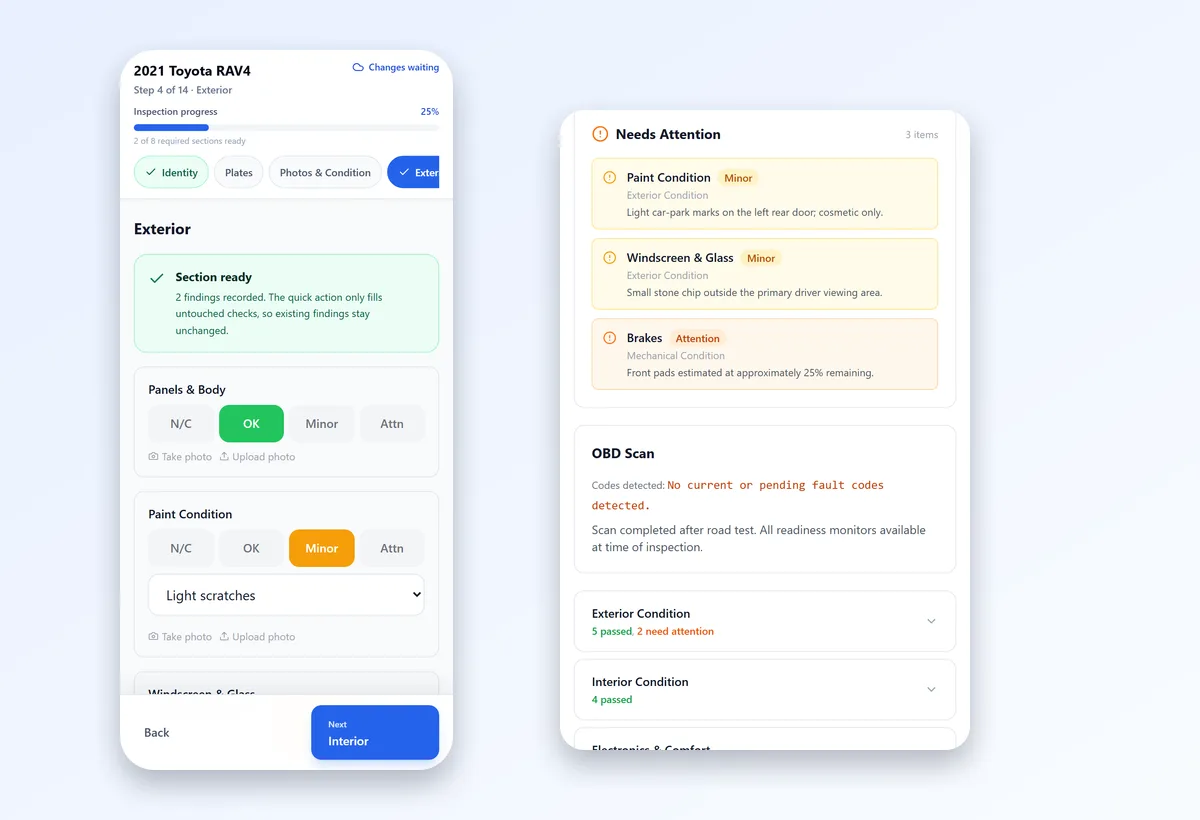
- 14guided steps on the phone
- 34steps in Deep Inspection
- Web + PDFbranded report every time
- 10free inspections to start
What InspectaCar does
InspectaCar is web-based inspection software built around one workflow: set up the vehicle, inspect on site, send the report. There is nothing to install. You open a secure link on your phone, complete the guided inspection, and the finished report is published as a branded web page and a one-click PDF.
- Guided mobile inspection. Large controls and step-by-step sections made for working on site, not at a desk.
- A real inspection template. 25 condition checks, up to 20 functional checks that adapt to the vehicle’s features, tyres at every wheel position, service history, an OBD scan and a road test.
- Photo evidence against each finding. Wide shots and close-ups sit with the item they relate to, instead of scattered through message threads.
- Deep Inspection mode. A 34-step guided flow covering exterior, mechanical, interior, tyres, undercarriage, documentation and service history, odometer readings before and after a test drive, imperfections with repair estimates and an optional walkaround video.
- Your branding. Your logo, colours and business name on every report, with InspectaCar kept in the background.
- Online report and PDF. Share a secure link, or save the report as a PDF that is small enough to email.
- Full history. Every vehicle, finding and report kept together and searchable, rather than buried in a chat history.
- Manual reports. Back-date a vehicle you inspected offline by entering the details and write-up in one go.
How a digital vehicle inspection works
- 1
Set up the vehicle
Add the customer and vehicle details, then open the secure inspection link on your phone.
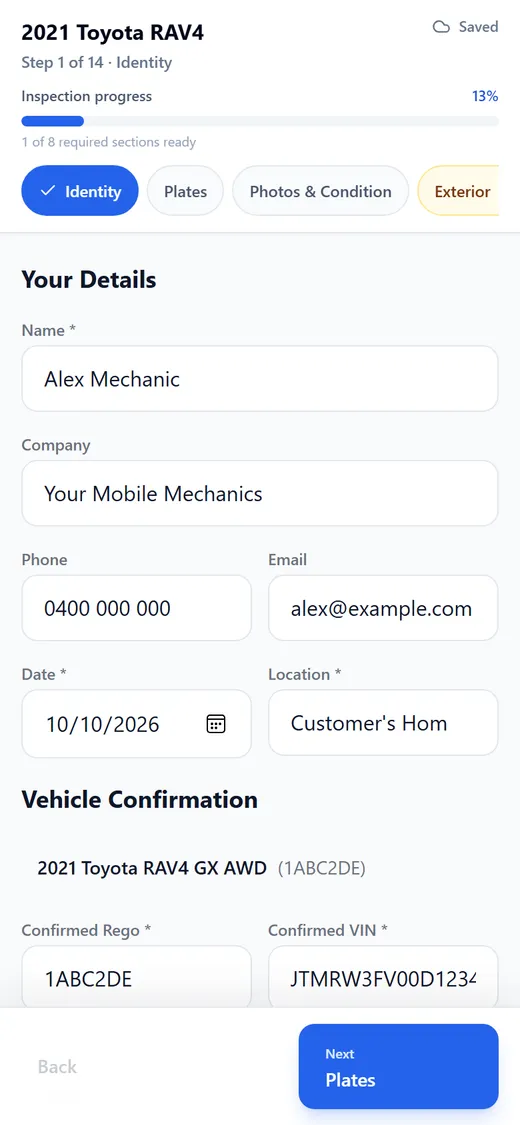
Step 1 of 14: confirm the vehicle. - 2
Inspect on site
Work through the guided steps, mark each check OK, Minor or Attention, add a detail and a photo for anything that is not clean.
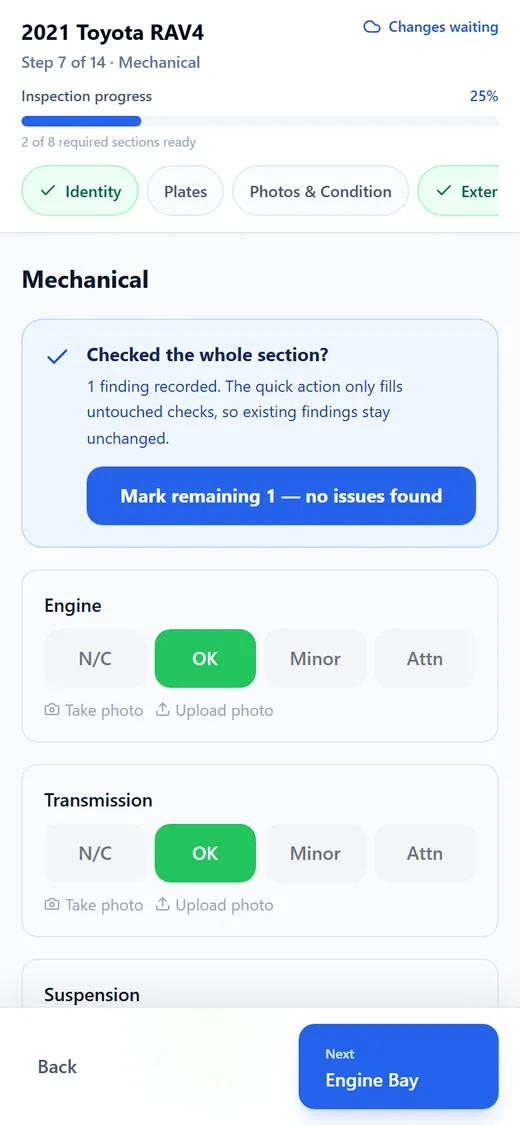
Every check has its own result buttons and photo buttons. - 3
Send the report
Publish a clean, branded report. Share the secure link or download the PDF for your customer.
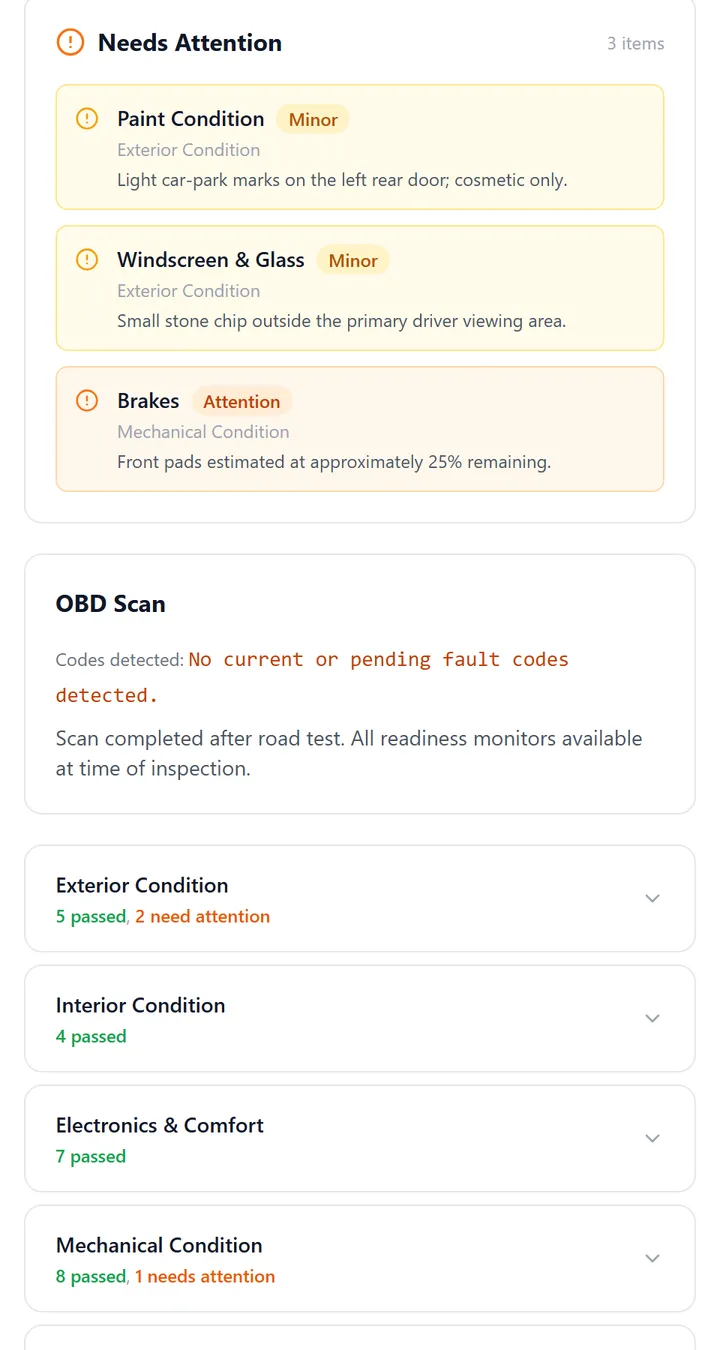
Findings that need attention are at the top of the report.
Digital vs paper inspections
| Paper or Word template | InspectaCar | |
|---|---|---|
| Photos | Separate camera roll, matched up later | Attached to the finding as you take them |
| Writing the report | Retyped after the job | Built from what you recorded on site |
| Consistency | Varies by person and day | The same guided steps every time |
| Customer delivery | Scan, photograph or retype | Branded link and PDF |
| Finding an old report | Search the filing cabinet | Search your inspection history |
Paper is fine for an occasional inspection. Software earns its keep once you inspect regularly. For more detail, read digital vs paper vehicle inspection forms.
One platform, four jobs
| If you need… | See |
|---|---|
| A pre-purchase inspection template and report for customers | Pre-purchase inspection template and software |
| A general vehicle or car inspection template for your workshop or fleet | Vehicle inspection template software |
| Condition reports for trade-ins, stock and wholesale | Vehicle condition report template |
| A branded report that replaces your Word or Excel template | Mechanic inspection report template |
Who it is for
| If you are… | What you get |
|---|---|
| A mobile mechanic | A professional handover for every pre-purchase inspection, done from the customer’s driveway. |
| A workshop | A repeatable inspection across your team, and every report looking the same. |
| A dealership or wholesaler | Consistent condition reports on stock and trade-ins that buyers can read before they bid. |
| An independent vehicle inspector | Reports under your own brand, with photos and findings that stand up to questions. |
Pricing
| Plan | Price | Includes |
|---|---|---|
| Free | A$0 | 10 inspections, full inspection reports, custom branding, photo uploads and mechanic mobile links |
| Unlimited | A$88.99 per month | Unlimited inspections, OBD scan results, paint depth reports and priority support |
Prices are in Australian dollars. No credit card is needed for the free plan, and you can cancel anytime. See the pricing page for the current plans.
Try it before you sign up
- Open the sample inspection report to see exactly what your customer receives.
- Try the mechanic workflow: an interactive demo that needs no account or vehicle data.
What InspectaCar is not
InspectaCar is software. It formats and delivers inspections that you or your team carry out. It does not perform or verify inspections, and its reports are not roadworthy, safety or compliance certificates. Reports state clearly that findings are the inspector’s own. If you need a statutory certificate for registration or transfer, you still need an authorised tester under your state’s rules.
Frequently asked questions
What is digital vehicle inspection software?
Software that replaces paper checklists for vehicle inspections: guiding the inspector through the steps, capturing photos and findings on a phone, and producing a professional report. InspectaCar is built for pre-purchase and condition inspections.
Do I need to install an app?
No. Mechanics receive a secure link and complete the inspection in their phone’s browser. Reports are published as a web page and PDF.
Is InspectaCar free?
There is a free plan with 10 inspections and no credit card required. The Unlimited plan is A$88.99 per month.
Can I put my own logo and colours on reports?
Yes. Every plan, including the free plan, supports your logo, colours and business name on the report and PDF.
Can I use InspectaCar for roadworthy certificates?
No. InspectaCar produces inspection reports, not statutory certificates. A roadworthy or safety certificate must be issued by an authorised tester under your state’s rules.
Can my whole team use it?
Yes. You can add mechanics who receive inspection links and users who manage inspections, with role-based access.